
About the App
App Preview & Screenshots



Description
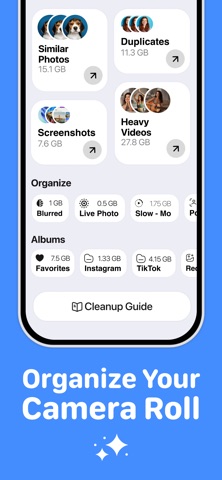
Clearly finds what fills up your storage and helps you clear it in minutes: duplicate and similar photos, blurry shots, piles of screenshots, heavy videos and duplicate contacts. Every scan runs on your device.
SMART CLEAN
One tap gathers the safe-to-remove stuff in one place: duplicates, similar shots, screenshots and large videos. Review it, keep what matters, delete the rest.
DUPLICATE & SIMILAR PHOTOS
Clearly groups identical and near-identical photos and suggests the best shot in each group. You decide what goes.
SMART SCREENSHOTS
Screenshots are sorted into receipts, chats, QR codes and memes using on-device text recognition. Old receipts and expired tickets are easy to let go.
SWIPE CLEAN
Go through your library one photo at a time. Swipe left to delete, right to keep. A fast way to tidy up years of photos.
VIDEO COMPRESSION WITH PREVIEW
Pick a quality level, see the estimated size, then compare the original and the compressed video side by side. Keep the smaller version only if you like how it looks.
MORE WAYS TO FREE UP SPACE
- Blurry photos and large files
- Heavy videos sorted by size
- Photo compression and HEIC to JPG conversion
- Live Photos to still images
- Cleanup by year: older photos are easier to let go
- Folders in the Files app
CONTACTS
Find duplicate and incomplete contacts and merge them in a few taps.
PRIVATE VAULT
Move personal photos and videos into a vault locked with a passcode and Face ID. A decoy code opens a separate, empty vault.
ON THIS DAY
Revisit photos taken on this date in past years, keep the best and clear the rest.
STAY ON TOP OF YOUR STORAGE
- Storage forecast shows when your space may run out
- Weekly cleanup streak
- Home Screen widget and Siri shortcuts
PRIVATE BY DESIGN
Photos, videos, contacts and files are analyzed on your device and are never uploaded to our servers.
Deleted photos go to Recently Deleted in the Photos app. The space is freed once you empty it there.
CLEARLY PRO
Some features and unlimited cleanup require a subscription. Payment is charged to your Apple ID account at confirmation of purchase. The subscription renews automatically unless it is cancelled at least 24 hours before the end of the current period. Your account is charged for renewal within 24 hours before the end of the current period. You can manage and cancel subscriptions in your App Store account settings.
Terms of Use: https://flashsoftapps.com/clearly-storage-cleaner-eula.html
Privacy Policy: https://flashsoftapps.com/clearly-storage-cleaner-privacy-policy.html
Key Features
- Smart Clean: One tap gathers duplicates, similar shots, screenshots and large videos in one place.
- Duplicate & Similar Photos: Groups identical and near-identical photos with smart best-shot suggestions.
- Smart Screenshots: Sorted into receipts, chats, QR codes and memes using on-device text recognition.
- Swipe Clean: Review your photo library one photo at a time — swipe left to delete, right to keep.
- Video Compression: Quality slider with live side-by-side comparison preview before saving.
- Contacts & Private Vault: Merge duplicate contacts and secure personal media behind Face ID.
- 100% On-Device & Private: Scanned locally on your phone and never uploaded to any external servers.
What's New
- Smart screenshots: receipts, chats, QR codes and memes sorted automatically
- Video compression with a quality slider and side-by-side preview
- On This Day: photos from this date in past years
- Weekly cleanup streak and helpful reminders
- Faster scans for duplicates and similar photos
- Clearly 2.0 complete redesign with a new look throughout the app
Verified App Store Reviews
Authentic feedback from real iOS users worldwide
Reclaimed 38GB of iPhone storage in under 5 minutes!
"My 128GB iPhone was constantly showing the 'Storage Full' prompt. Clearly sorted through 14,000 photos and videos, grouped hundreds of duplicate burst shots, and compressed several heavy 4K concert videos without visual quality loss. Best part: everything is processed on-device with zero cloud uploads."
Saved me from paying Apple another $9.99/mo for iCloud
"I was about to upgrade my iCloud storage tier again. Clearly identified ghost screenshots, old meme folders, and duplicate contacts I had forgotten about. Super smooth swipe interface and feels native to iOS."
Clean, fast, and no aggressive subscription traps
"Most cleaner apps bombard you with popups every 3 seconds. Clearly is respectably designed, transparent about deleted items (sends them safely to Recently Deleted), and remarkably fast on Apple Silicon."
Frequently Asked Questions



Guides & Tutorials for Clearly
View all 36 guidesThe 3,000 Screenshot Trap: How to Auto-Sort & Purge Old Receipts, Memes & Chats
How to Clear Cache in Firefox, Edge & Brave on iPhone and Android (Side-by-Side Guide)
4K Video Storage Explosion: How to Compress Gigantic iPhone Videos Without Quality Loss
Hidden Storage Eaters: What is 'System Data' and How to Safely Remove It
Benchmarks & Interactive Tools for Clearly
Privacy & Terms of Service
FlashSoft ensures end-to-end data security and compliance for Clearly.